Transcribing audio and videos files with Alter
Learn how to transcribe audio and video files with Alter using simple drag-and-drop functionality. Supports multiple file formats and parallel transcription for quick content processing.
The guide to use this feature is already available!
Read it here:Transcribing audio and videos files with Alter Olivier
Hey everyone,
Alter makes it incredibly easy to convert your audio and video files into searchable, interactive text — just drag and drop your files, and let Alter do the rest.
Effortless Transcription — Just Drag & Drop
Gone are the days of complex transcription workflows. With Alter's new feature, transcribing audio and video files is as simple as dragging them into the app. That's it! No complicated setup, no learning curve — just pure simplicity.
Here's how it works:
- Take any audio or video file
- Drag it into Alter
- Watch as it automatically transcribes in real-time
- Click to view the complete transcription
Powerful Batch Processing
Need to transcribe multiple files? No problem! Alter can handle multiple audio and video files simultaneously. Simply drag several files at once, and Alter will process them all in parallel — saving you precious time and effort.
Your Choice: Remote or Local Processing
Whether you prefer cloud-powered transcription or want to keep everything local using your own AI models, Alter adapts to your workflow and privacy preferences.
Interactive Intelligence
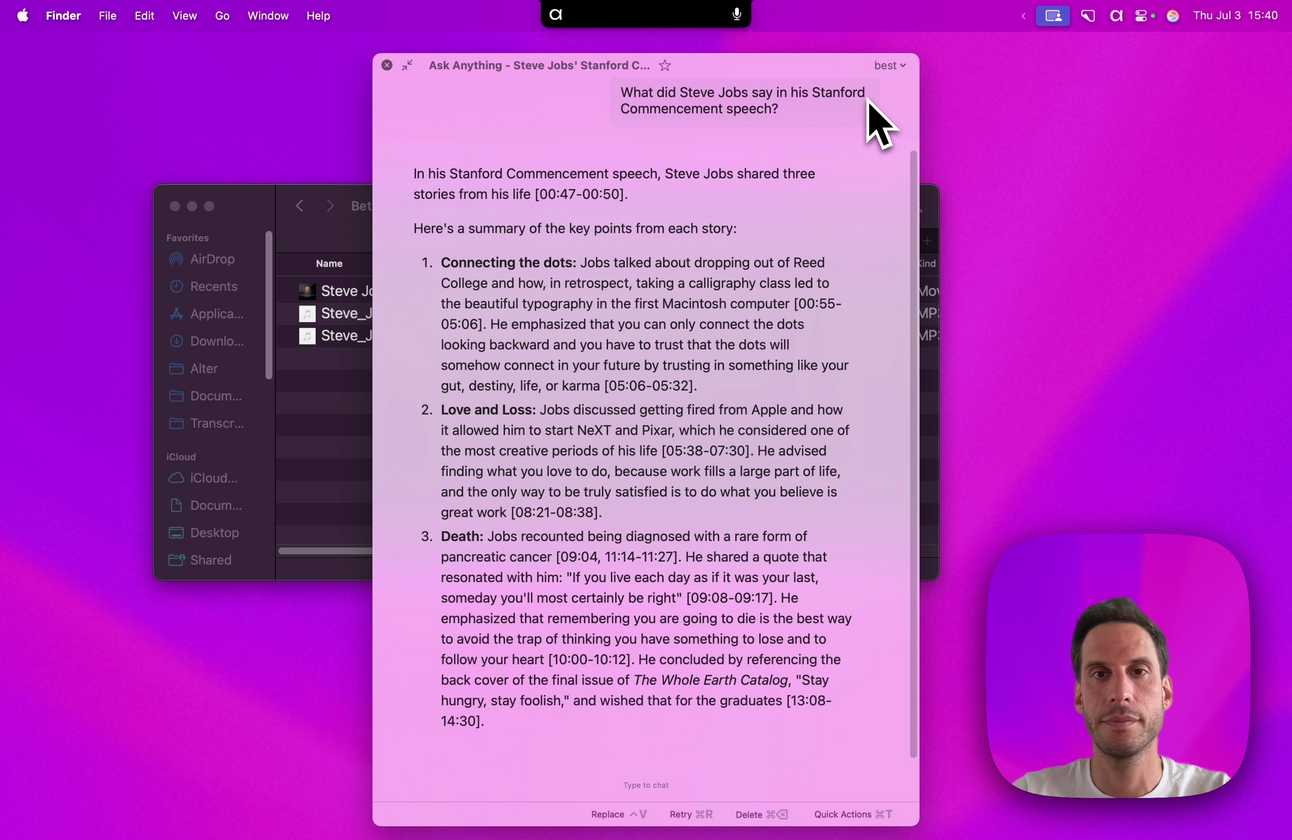
Once transcribed, you can immediately interact with your content. Ask questions like "What did Steve say in his speech?" and get instant, contextual answers from your transcribed files.
Here are some great examples of how this can supercharge your workflow:
- Podcasts
Quickly transcribe entire podcast episodes to create show notes, quotes, or searchable archives. Easily find “What did the guest say about X?” without listening again. - Video Tutorials
Convert your tutorial videos into text so you can generate step-by-step guides, captions, or FAQs in minutes, saving hours of manual work. - Meetings & Interviews
Record and transcribe your meetings or interviews for accurate minutes and easy reference. Plus, transcribe multiple sessions simultaneously to stay on top of your workload. - Lectures & Webinars
Capture detailed transcripts of educational content to review key points or share with your team or students effortlessly. - Speech & Presentations
Transcribe speeches or presentations to extract insights, quotes, or summaries that help you communicate more effectively.
Try it out today by dragging your files into Alter and see how easy transcription becomes!
Best regards,
The Alter Team
Full Changelog
New Features & Enhancements
- Auto-generate transcripts when adding audio or video files
Bug Fixes & Stability
- Fixed global shortcuts misses with custom actions
- Fixed CoreData crashes when reading contexts that are arrays
- Disabled transcription in transcript context to prevent issues
- Improved dictation history performance display
- Fixed tool client management: stop clients when no tools available, start when tools are present
- Prevented starting tool clients when no tools are configured for the current context
Videos on Alter
- AI can now read your clipboard : create incredible workflows
- Unlock YouTube superpowers - extract info & master anything
- Live AI chat with any website: documentation, articles & more
- Automatic email outreach in 3 min - no effort - onboard your new users
- Write a newsletter in 5 min with AI, walking in a parc