Live Notepad: your meeting's new best friend
Interact with your live transcript and all your favorite tools and services in meetings and during class
Hey everyone,
You know that moment in a meeting when something important gets said, and you're frantically typing notes while also trying to pay attention? Yeah, we fixed that.
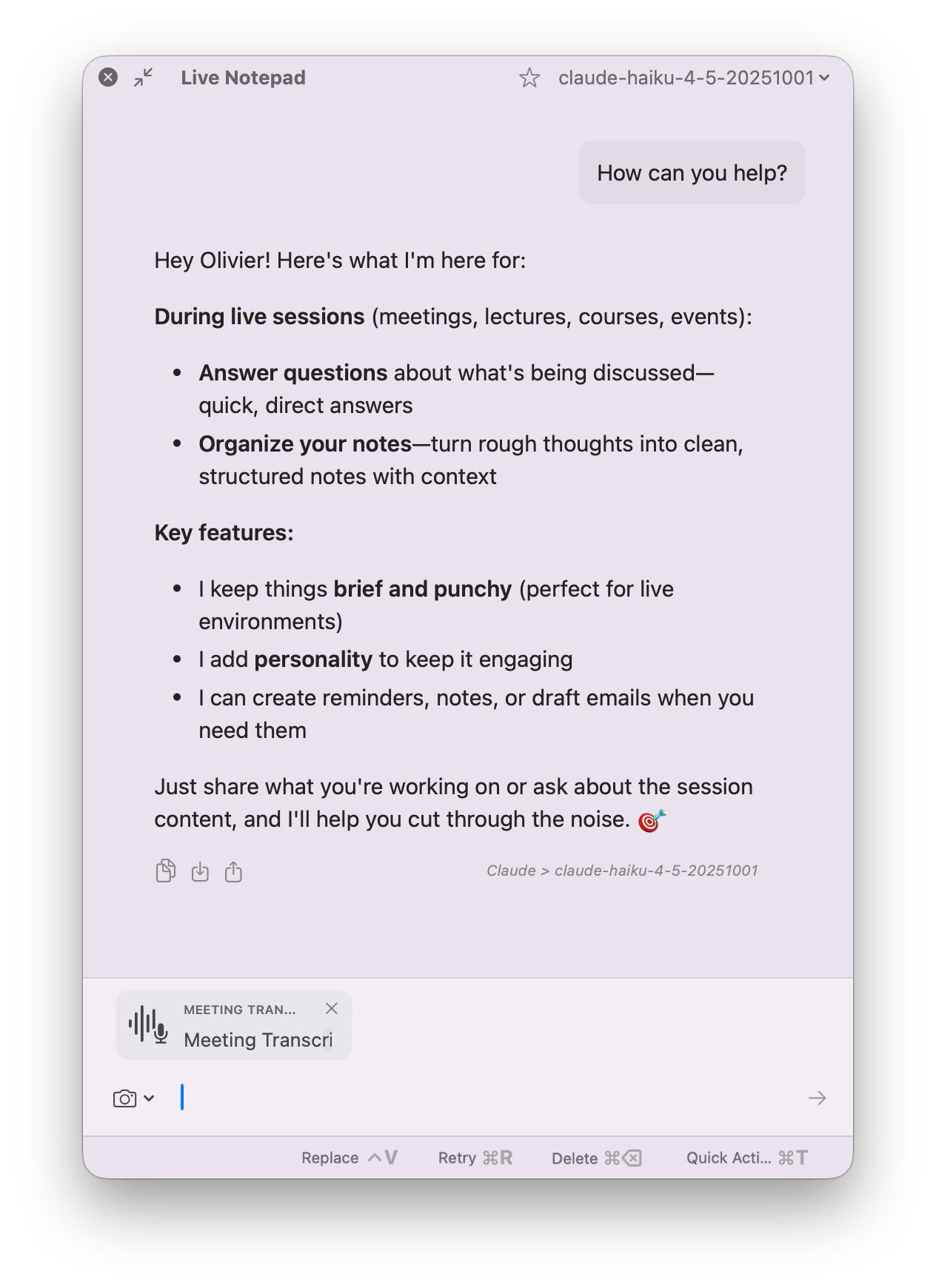
Introducing the Live Notepad—an Alter Conversation window that lets you interact with what's happening as it happens.
🎶 Scotch - Penguin Invasion (Original) 🎶
Here's what you can do with it
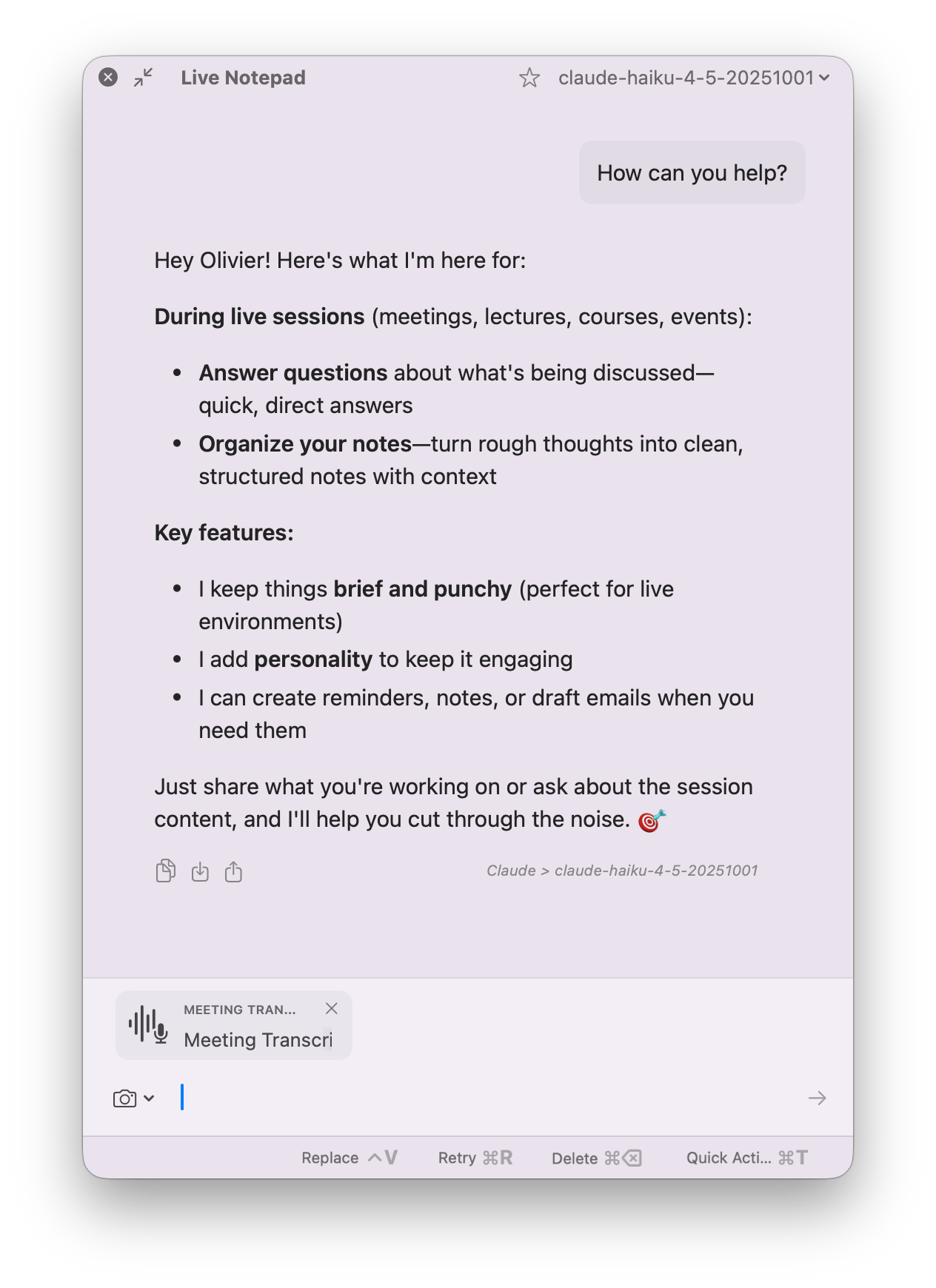
During a meeting:
- Use your tools to retrieve important informations about the meeting from your emails, google drive etc…
- Take screenshots of slides or content—they automatically get added to your context
- Ask the AI questions about what's being discussed, right then and there
Capture knowledge instantly:
- Create Apple Notes with study questions from a lecture slide
- Set reminders to follow up on action items (with timestamps and context)
- Use any Alter tool directly from the notepad—it all feeds into your workflow
After the meeting:
- The notepad content combines with your transcript to create deeper meeting recaps
- Everything's there—the words and the context you captured
How it works
- Start recording your meeting
- Hit the shortcut to bring up Live AI Notepad
cmd+shift+➔or click the menu bar entry - Watch the Live Notepad appear on the right
- Take screenshots, ask questions, create notes—all while staying in the conversation
- Once you're done, the recap pulls everything together
Pro tip: Stealth mode for screen sharing
Want to avoid people noticing you're using Alter while screen-sharing?
Go to Settings > Appearance > Hide Alter from screen captures.
All Alter windows will be hidden. Some tools charge $500/year for this feature alone. We're not some tools.
Customize it your way
Because this is an Alter action, you can:
- Choose which tools can be used in the notepad
- Pick your AI model
- Adjust the system prompt to match your workflow
Why this matters
Meetings aren't just about listening anymore, they're about capturing and acting on information. Live Notepad turns passive note-taking into active learning and task creation.
Online class? Create study guides as you learn.
Client call? Generate action items with full context.
Conference talk? Build your own knowledge base in real-time.
The Live Notepad can be pretty ressource intensive.
Please let us know how you experience goes either on Discord or via email at [email protected] Olivier
Ready to try it?
Update to the latest version and hit that shortcut during your next meeting.
Hit reply and let us know how it changes your workflow.
Cheers,
Full Changelog
New Features & Enhancements
- Live Notepad: Real-time AI assistant during meetings and videos with a toggle shortcut (default: cmd+shift+→)
- Screen Sharing Privacy: Option to hide Alter from screen sharing
- Screenshot in Conversations: Added screenshot capabilities directly within conversation windows
Bug Fixes & Stability
- Live Captions: Disabled for non-WhisperKit Pro users to prevent recording errors
- Conversation Renaming: Fixed issues when renaming conversations in the notch
- Conversation Window: Adding context now properly updates the context strip
- Transcript Actions: Fixed trash icon functionality in recent transcripts
- Audio Recording: Notification after 2 minutes of low audio detection
- Context Menu: Action line is now fully clickable
- Apple Calendar & Notes: Better descriptions for better accuracy at tool use
Performance Improvements
- Notch Opening: Minor performance improvements when opening the notch
- Recording Start: Reduced startup time when beginning a recording
- Main Thread: Avoided blocking main thread for more than 3 seconds when fetching keywords
Videos on Alter
- AI can now read your clipboard : create incredible workflows
- Unlock YouTube superpowers - extract info & master anything
- Live AI chat with any website: documentation, articles & more
- Automatic email outreach in 3 min - no effort - onboard your new users
- Write a newsletter in 5 min with AI, walking in a parc